MAC Address Validator
 How to validate and decode MAC (Media Access Control) addresses?
In order to help your programming or testing tasks, FYIcenter.com has designed this online tool for you to validate and decode any given MAC address.
All you need to do is to enter a MAC address and click the "Validate" button. Validation result will be displayed in the result area. Manufacturer OUI {Organizationally Unique Identifier}, company name and address are also displayed.
✍: FYIcenter.com
Validation result by FYIcenter.com - MAC Address:
Specified MAC Address: Valid ✔
MAC address specified: 00-08-20-83-53-D1
MAC address normalized: 00-08-20-83-53-D1

Is It Unicast or Multicast?
   Unicast: First bit = 0. Identifies a single device.

Is It Global or Local?
   Global: Second bit = 0. Valid globally.

Manufacturer Info:
   OUI: 00-08-20
   Name: Cisco Systems, Inc
   Address:
      80 West Tasman Drive
      San Jose  CA  94568
      US
What is a valid MAC address?
A MAC (Media Access Control) address is a unique identifier assigned to most network adapters or Network Interface Cards (NICs) by the manufacturer for identification, IEEE 802 standards use 48 bites or 6 bytes to represent a MAC address. This format gives 281,474,976,710,656 possible unique MAC addresses.
IEEE 802 standards define 3 commonly used formats to print a MAC address in hexadecimal digits:
- Six groups of two hexadecimal digits separated by hyphens (-), like 01-23-45-67-89-ab
- Six groups of two hexadecimal digits separated by colons (:), like 01:23:45:67:89:ab
- Three groups of four hexadecimal digits separated by dots (.), like 0123.4567.89ab
Other formats used are:
- Without any separator, like 0123456789ab
- With space separator, like 01 23 45 67 89 ab
- In four groups of three digits, like 012:345:678:9ab
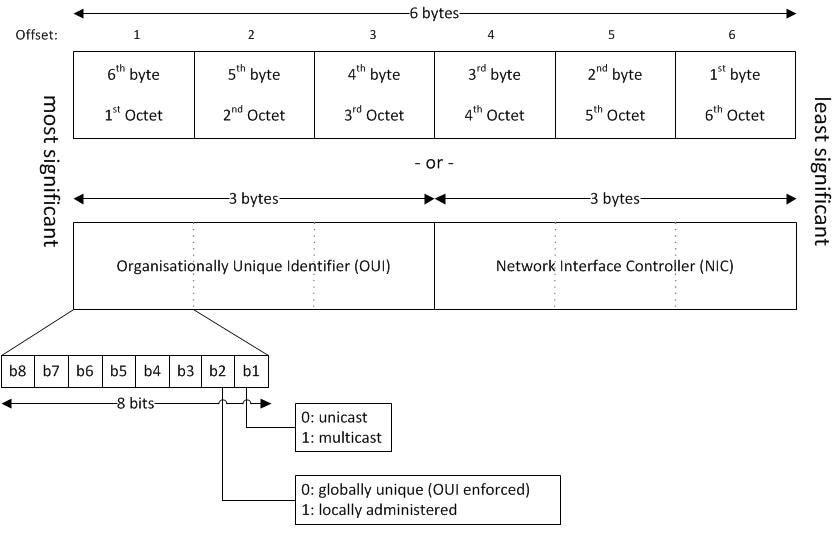
What is the structure of MAC address?
The following picture shows the internal structure a MAC address:
To generate MAC addresses for testing, use "Test MAC Address Generator" tool.
⇐ Convert IPv6 to IPv4 Address
⇑⇑ Online Tools
2025-05-14, ≈2608🔥, 39💬
Related Topics:


