Run My First JMeter Test
How to Run my First Test with JMeter?
✍: FYIcenter.com
 If you have created your first test in JMeter as described
in the previous tutorial, you run it using these steps.
If you have created your first test in JMeter as described
in the previous tutorial, you run it using these steps.
1. Start JMeter on your computer.
2. Click "File > Open" menu to open your first JMeter test stored in "\fyicenter\First-Test.jmx". You see the test displayed in the main panel.
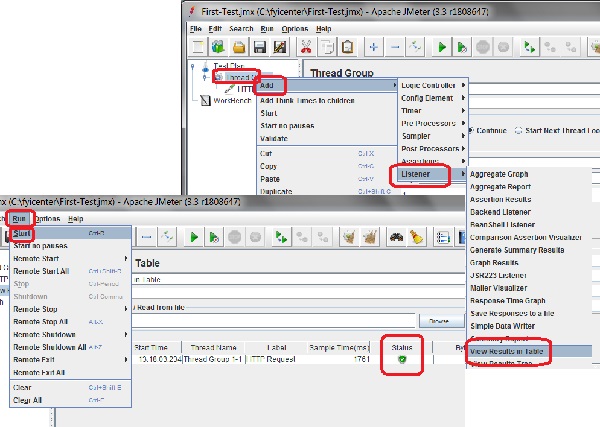
3. Right-click on "Thread Group" in the left panel and select "Add > Listener > View Results in Table". You see the "View Results in Table" panel displayed.
4. Click "Run > Start" menu to run the test once. You see that the HTTP Request sampler gets executed once with a successful status.
5. Click "File > Save Test Plan As" menu and save it as "\fyicenter\First-Test.jmx".
The picture below shows you how to run your first JMeter test:
⇒ Testing Web Application with JMeter
2017-11-18, ∼3277🔥, 0💬
Related Topics:
