Create REST Project in SoapUI
How to create a REST project in SoapUI to test REST APIs?
✍: FYIcenter.com
 This tutorial shows you
how to create a REST project in SoapUI to test a REST API
using iextrading.com API as an example.
This tutorial shows you
how to create a REST project in SoapUI to test a REST API
using iextrading.com API as an example.
1. Start SoapUI on your computer.
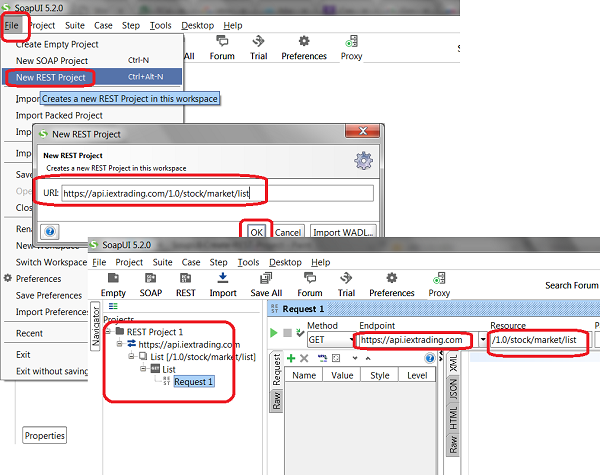
2. Click "File > New REST Project". You see the "New REST Project" dialog box.
3. Enter the following URL in the URL field:
https://api.iextrading.com/1.0/stock/market/list/mostactive
4. Click "OK". You see "REST Project 1" created with the following objects:
Project: REST Project 1
Service: https://api.iextrading.com
Resource: List [/1.0/stock/market/list/mostactive]
Method: GET
Request: Request 1
5. Double-click on "Request 1" to open it. You see the following settings for the request.
Method: GET
Endpoint: https://api.iextrading.com
Recource: /1.0/stock/macket/list
Parameters: None
6. Click "File > Save All Projects" menu and save it as "\fyicenter\REST-project.xml".
Notice that how the REST API URL is divided into 2 parts: Endpoint and Resource.
The picture below shows you how to create a REST project in SoapUI to test REST APIs:
⇒ Run REST Project Request in SoapUI
⇐ What Are CRUD Operations in RESTful API
2018-03-24, ∼2739🔥, 0💬
Related Topics:
