Create Load Test with SoapUI
How to create a load test with SoapUI? I have created test steps for the load test.
✍: FYIcenter.com
 You can follow this tutorial to create a load test in SoapUI.
1. Start SoapUI on your computer.
2. Click "File > Import" menu to open your Flickr SoapUI test project stored in "\fyicenter\Flickr-project.xml".
3. Click to open "TestCase 1"
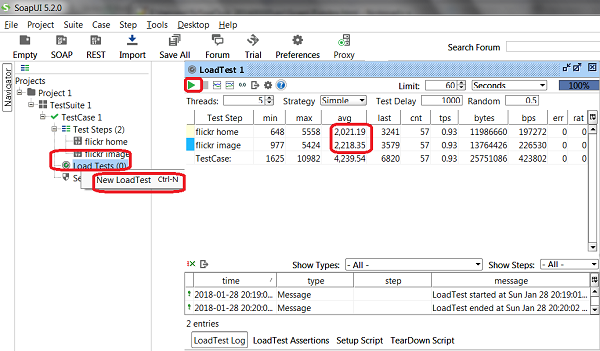
4. Right-click on "Load Tests" under "TestCase 1" and select "New LoadTest". You see a new load test window "LoadTest 1" added with default parameters.
5. Click "Run" icon on the load test window. You see load test started.
6. Wait for the test to finish. You see the average response time of "flickr home" is about 2.0 seconds and "flickr image" is about 2.2 seconds.
The picture below shows you how to Create Load Test with SoapUI:
⇒ Load Test Parameters in SoapUI
⇐ Build Test Steps for Load Test with SoapUI
2018-03-10, ∼2519🔥, 0💬
Related Topics:
