Build Object Repository with Object Spy
How to Build Object Repository with Object Spy?
✍: FYIcenter.com
 When writing UFT scripts for testing Web applications,
you need to reference objects on each web pages.
One way to build object repository is to use the UFT recording tool.
Another way is to use the "Object Spy" tool as shown in this tutorial.
When writing UFT scripts for testing Web applications,
you need to reference objects on each web pages.
One way to build object repository is to use the UFT recording tool.
Another way is to use the "Object Spy" tool as shown in this tutorial.
1. Start Google Chrome and go to "http://sqa.fyicenter.com".
2. Start UFT with a new UFT test.
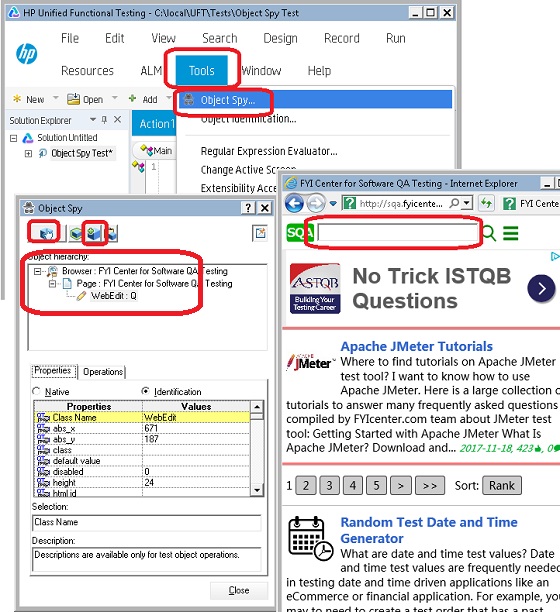
3. Click "Tools > Object Spy" menu. You see the Object Spy window.
4. Click the "Spy" icon. You see your mouse pointer becoming a spy tool.
5. Go back to the browser and spy the search box near the top of the Web page. You see the search box is highlighted.
6. Click on the search box. You see object properties are captured in the Object Spy window.
7. Click the "Add" icon. You see the captured object added to the local object repository.
The following picture shows you how to Build Object Repository with Object Spy:
⇒ Verify Captured Objects on Web Page
2018-05-19, ∼3197🔥, 0💬
Related Topics:

