Create My First SoapUI Test
How to Create my First Test with SoapUI? I have just installed SoapUI on my computer.
✍: FYIcenter.com
 You can follow this tutorial to create your first SoapUI test.
1. Start SoapUI on your computer.
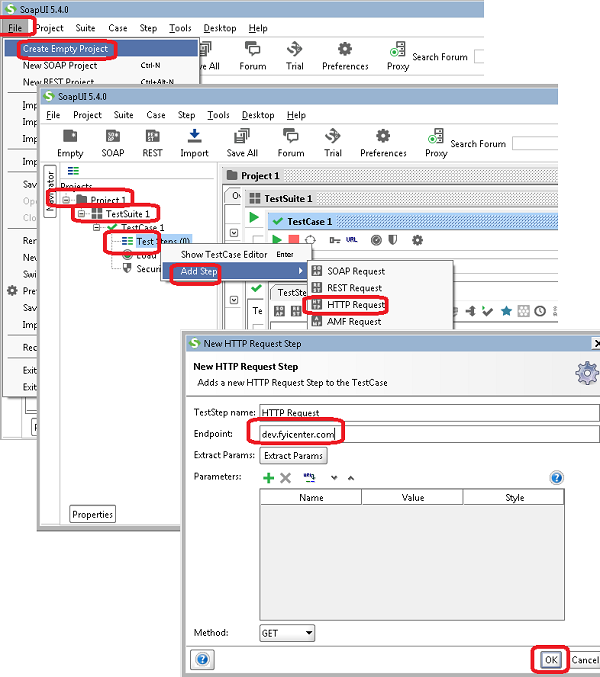
2. Click on "File > Create Empty Project" menu. You see a new project "Project 1" created.
3. Right-click on "Project 1" in left panel and select "New TestSuite". You see a new test suite "TestSuite 1" added.
4. Right-click on "TestSuite 1" in the left panel and select "New TestCase". You see a new test case "TestCase 1" added.
5. Right-click on "Test Steps" under "Test Case 1" in the left panel and select "Add Step > HTTP Request". You see the "New HTTP Request Step" dialog box.
6. Enter "dev.fyicenter.com" in the "Endpoint" field and click "OK". You see a new "HTTP Request" added.
7. Click "File > Save All Projects" menu and save it as "\fyicenter\First-project.xml".
The picture below shows you how to create your first SoapUI test project:
2018-05-08, ∼2655🔥, 0💬
Related Topics:
