Convert Chrome Selenium IDE Test to Python
How to Convert Chrome Selenium IDE Test to a Python program using WebDriver client API?
✍: FYIcenter.com
 If you like what you have recorded in a test with Selenium IDE for Chrome
you can follow this tutorial
to convert it a Python program using WebDriver client API,
If you like what you have recorded in a test with Selenium IDE for Chrome
you can follow this tutorial
to convert it a Python program using WebDriver client API,
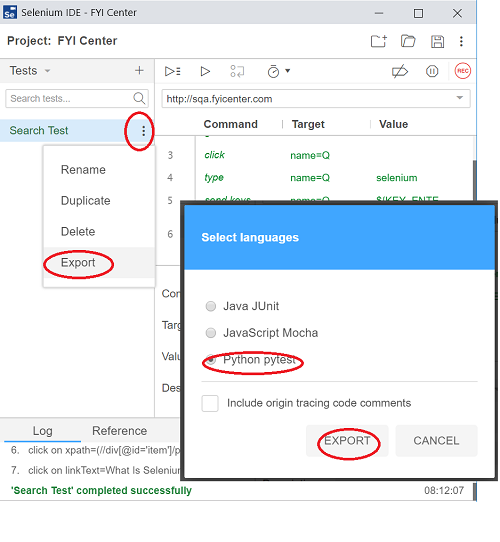
1. Right-click the test name "Search Test". You see the context menu.
2. Click "Export" command from the context menu. You see export options.
3. Select "Python pytest" and click "EXPORT".
4. Save the exported Python program file to a folder like "C:\fyicenter\test_search.py".
5. Open the saved Python program file in a text editor to review.
// Generated by Selenium IDE
import org.junit.*;
import static org.junit.Assert.*;
import static org.hamcrest.CoreMatchers.is;
import static org.hamcrest.core.IsNot.not;
import org.openqa.selenium.*;
import org.openqa.selenium.firefox.FirefoxDriver;
import org.openqa.selenium.interactions.Actions;
import org.openqa.selenium.support.ui.*;
import java.util.*;
public class SearchTestTest {
  private WebDriver driver;
  private Map<String, Object> vars;
  JavascriptExecutor js;
  @Before
  public void setUp() {
    driver = new FirefoxDriver();
    js = (JavascriptExecutor) driver;
    vars = new HashMap<String, Object>();
  }
  @After
  public void tearDown() {
    driver.quit();
  }
  @Test
  public void searchTest() {
    driver.get("http://sqa.fyicenter.com/");
    driver.manage().window().setSize(new Dimension(1211, 648));
    driver.findElement(By.name("Q")).click();
    driver.findElement(By.name("Q")).sendKeys("selenium");
    driver.findElement(By.name("Q")).sendKeys(Keys.ENTER);
    driver.findElement(By.xpath("(//div[@id=\'item\']/p/a/span)[6]")).click();
    driver.findElement(By.linkText("What Is Selenium")).click();
  }
}
As you can see, the exported Python program uses the Firefox class from the Selenium WebDriver Python API. But you can change it the Chrome class if you want to.
The exported Python program only prepare a TestSearchTest class to be executed with the "pytest" module. But you also create an instance of the TestSearchTest class and execute it.
⇒ Add/Delete Steps in Selenium IDE for Chrome
⇐ Convert Chrome Selenium IDE Test to Java
2019-09-04, ∼9746🔥, 0💬
Related Topics:
