Extract Login URL from Home Page Response
How to extract the login page URL from the home page response text?
✍: FYIcenter.com
 You can add a Regular Expression Extractor to the HTTP request
to extract the login page URL from the home page HTTP response text.
as shown in this tutorial.
You can add a Regular Expression Extractor to the HTTP request
to extract the login page URL from the home page HTTP response text.
as shown in this tutorial.
1. Start JMeter on your computer and open "\fyicenter\Facebook-Login-Test-3.jmx".
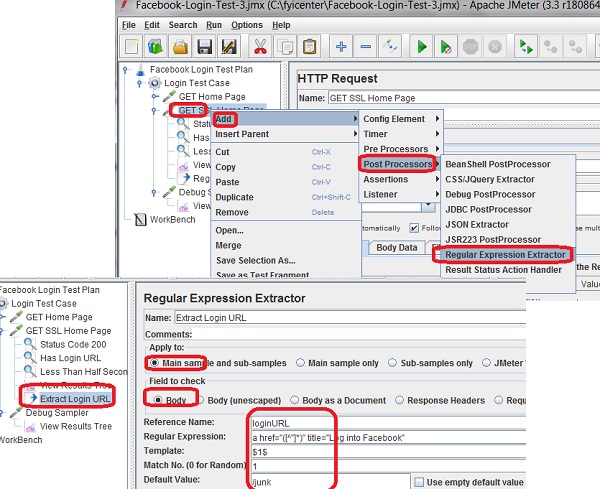
2. Right-click on the "GET SSL Home Page" HTTP Request sampler, and select "Add > Post Processors > Regular Expression Extractor". You see the "Regular Expression Extractor" settings screen.
3. Modify the following settings to take the first matched group of the first match to create a new variable called "longURL":
Name: Extract Login URL
Apply to: Main sample and sub-samples
Field to check: Body
Reference Name: loginURL
Regular Expression: a href="/([^"]*)" title="Log into Facebook"
Template: $1$
Match No.: 1
Default Value: /junk
4. Click "File > Save Test Plan As" menu and save it as "\fyicenter\Facebook-Login-Test-4.jmx".
5. Click "Run > Start" menu to run the test.
6. The login page URL should be stored in the variable "loginURL" now.
The picture below shows you how to use Duration Assertion to verify HTTP request execution time:
⇒ Call Login Page with Extracted URL
⇐ Assertion on Home Page Response Time
2017-11-18, ∼6360🔥, 0💬
Related Topics:
