View Result in Table for Entire Test Plan
How to use the View Result in Table listener list result from all samplers in a table format?
✍: FYIcenter.com
 You can follow this tutorial to learn how to use the
View Result in Table listener.
You can follow this tutorial to learn how to use the
View Result in Table listener.
1. Open "\fyicenter\Facebook-Login-Test-6.jmx".
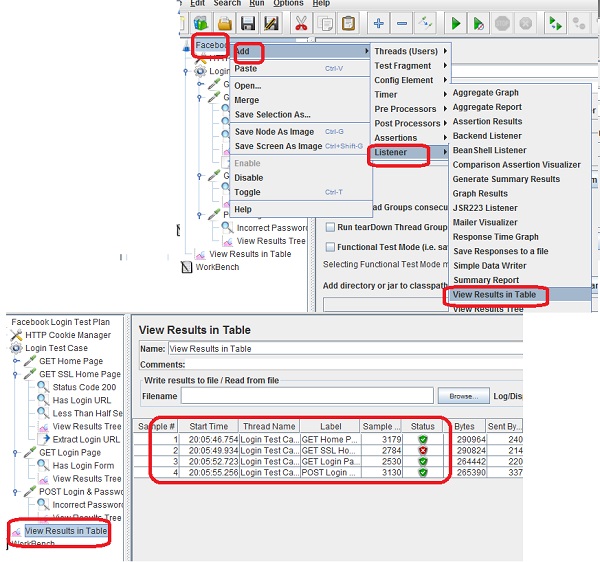
2. Right-click on the "Facebook Login Test Plan", and select "Add > Listener > View Result in Table". You see the "View Result in Table" settings screen.
5. Save the test plan as "\fyicenter\Facebook-Login-Test-7.jmx" and run it. You see test result of each sampler listed in a table.
Sample #2 "GET SSL Home Page" failed, because it took more than 500 milliseconds to execute.
The picture below shows you how to use the View Result in Table listener to list test results of all samplers:
⇒ Variables and Functions in JMeter
⇐ HTTP Cookie Manager for Web Testing
2017-11-18, ∼2975🔥, 0💬
Related Topics:
