Run JMeter Test Plan in Command Line
Q
How to run a JMeter Test Plan in command line mode? I have a Test Plan stored in Facebook-Login-Test-7.jmx.
✍: FYIcenter.com
A
 To run a JMeter Test Plan in command line mode, you need to:
1. Make sure you have "View Result in Table" listener included in the test plan to generate result.
2. Run JMeter using the following command:
>\fyicenter\jmeter\bin\jmeter -n -t test-plan.jmx -l test-result.csv
For example:
>\fyicenter\jmeter\bin\jmeter -n -t Facebook-Login-Test-7.jmx -l Test-Result.csv

Creating summariser
Created the tree successfully using Facebook-Login-Test-7.jmx
Waiting for possible Shutdown/StopTestNow/Heapdump message on port 4445

summary =  4 in 00:00:22 =  0.2/s Avg:  5422 Min:  3966 Max:  7299 Err:  1 (25.00%)
... end of run
The summary line tells us that:
- There are 4 samplers in this test.
- Average sampler execution time is 5.422 seconds.
- 1 out of 4 (25%) samplers failed.
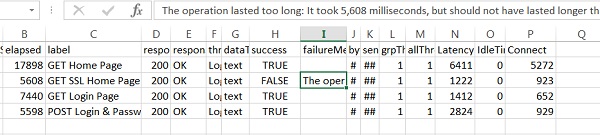
If you open Test-Result.csv in Excel, you will see more information about each sampler execution:
⇒ Override JMeter Variable from Command Line
2017-11-18, ∼3665🔥, 0💬
Related Topics:
