Define Variable as Part of Test Plan
Q
How to define a variable as part of my JMeter Test Plan?
✍: FYIcenter.com
A
 You can follow this tutorial to define a variable as part of your Test Plan.
1. Run JMeter and create a test plan called Get-Exchange-Rate.jmx.
2. Click to open the test plan properties panel.
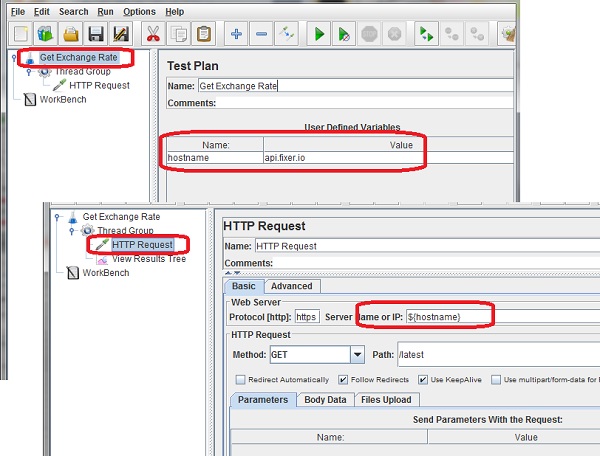
3. Click "Add" to define a new variable:
Name: hostname
Value: api.fixer.io
4. Add a thread group and child HTTP Request sampler with these properties:
Name: Latest Exchange Rate
Protocol: https
Server Name: ${hostname}
Method: GET
Path: /latest
5. Save the test plan and run it. JMeter will make HTTP request of GET https://api.fixer.io/latest.
The picture below shows you how to define a variable as part of the test plan properties:
⇒ Define Variable as Part of Post-Processors
⇐ What Are User Defined Variables
2018-06-05, ∼2999🔥, 0💬
Related Topics:

