Define Variable as Part of BeanShell
How to define a variable as part of a BeanShell script?
✍: FYIcenter.com
 You can follow this tutorial to define a variable as part of
a BeanShell script.
You can follow this tutorial to define a variable as part of
a BeanShell script.
1. Open Get-Exchange-Rate-2.jmx.
2. Add another variable in the Test Plan:
Name: url
Value: https://api.fixer.io/latest
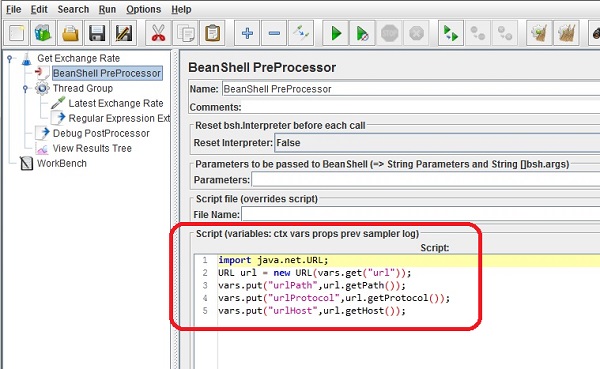
3. Add a BeanShell PreProcessor before the Thread Group with the following script:
import java.net.URL;
URL url = new URL(vars.get("url"));
vars.put("urlProtocol",url.getProtocol());
vars.put("urlHost",url.getHost());
vars.put("urlPath",url.getPath());
The above BeanShell script parses the "url" variable into 3 new variables: "urlProtocol", "urlHost" and "urlPath".
4. Open "Last Exchange Rate" and update its properties with:
Protocol: ${urlProtocol}
Server Name: ${urlHost}
Path: ${urlPath}
5. Save the test plan as Get-Exchange-Rate-3.jmx, and run it. You will see the latest exchange rate in the response.
The picture below shows you how to add variables BeanShell scripts:
⇒ List Variables with Debug PostProcessor
⇐ Define Variable as Part of Post-Processors
2018-05-23, ∼7363🔥, 0💬
Related Topics:

