XPath Assertion - XPath Expression Matches
How to use XPath Assertion to validate XML message in JMeter?
✍: FYIcenter.com
 The XPath Assertion allows you to validate the response XML
message with an XPath expression match.
If a match is found, the assertion is passed.
The XPath Assertion allows you to validate the response XML
message with an XPath expression match.
If a match is found, the assertion is passed.
You can follow this tutorial to see how XPath Assertion works.
1. Copy and create a Test Plan called Azure-Echo-API-3.jmx.
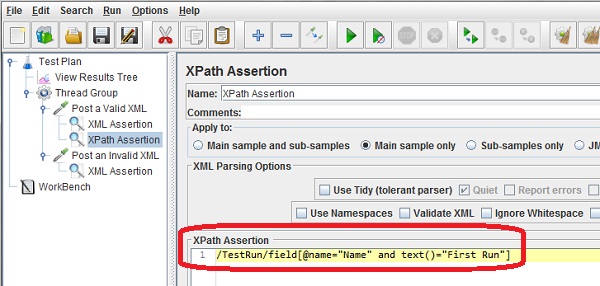
2. Add an XPath Assertion to "Post a Valid XML" sampler with the following XPath expression which looks for an XML element called "field" under "/TestRun" with an attribute of name="Name" and a test content of "First Run":
/TestRun/field[@name="Name" and text()="First Run"]
3. Run the test plan and open the "View Results Tree" listener. You see the "Post a Valid XML" sampler passed, because a match was found in the XML message.
The picture below shows you how to setup an XPath Assertion to validate XML responses:
⇒ XPath Extractor - Capture XML Data
⇐ XML Assertion - XML Validation
2018-10-08, ∼6267🔥, 0💬
Related Topics:

