XPath Extractor - Capture XML Data
How to use XPath Extractor to capture data from XML message in JMeter?
✍: FYIcenter.com
 The XPath Extractor allows you to capture data with an XPath expression match.
If a match is found, the matched data is capture in a given variable.
The XPath Extractor allows you to capture data with an XPath expression match.
If a match is found, the matched data is capture in a given variable.
You can follow this tutorial to see how XPath Extractor works.
1. Copy and create a Test Plan called Azure-Echo-API-4.jmx.
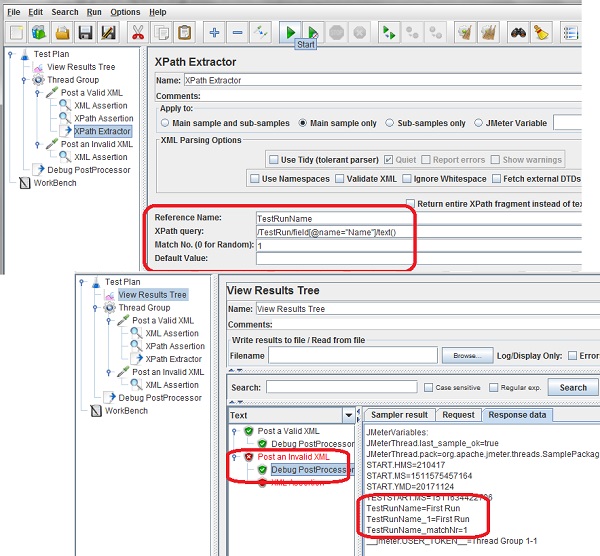
2. Add an XPath Extractor to "Post a Valid XML" sampler with the following XPath expression which looks for the text content of an XML element called "field" under "/TestRun" with an attribute of name="Name":
Reference Name: TestRunName
XPath Query: /TestRun/field[@name="Name"]/text()
Match No.: 1
Default Value:
3. Run the test plan with a Debug PostProcessor and open the "View Results Tree" listener.
4. Check the output of Debug PostProcessor under "Post a Valid XML". You may not see the XML data captured in "TestRunName", because the "XPath Extractor might be executed after the Debug PostProcessor.
5. Check the output of Debug PostProcessor under "Post an Invalid XML". You see the XML data captured in "TestRunName" as "First Run".
The picture below shows you how to capture XML data with an XPath Extractor:
⇒ Working With JSON Body Messages
⇐ XPath Assertion - XPath Expression Matches
2018-10-08, ∼4554🔥, 0💬
Related Topics:

