XML Assertion - XML Validation
How to use XML Assertion to validate XML messages in JMeter?
✍: FYIcenter.com
 The XML Assertion allows you to validate if the Sampler
returns a well-formed XML or not.
It does not validate the XML based on a DTD or schema
or do any further validation.
The XML Assertion allows you to validate if the Sampler
returns a well-formed XML or not.
It does not validate the XML based on a DTD or schema
or do any further validation.
You can follow this tutorial to see how XML Assertion works.
1. Copy and create a Test Plan called Azure-Echo-API-2.jmx.
2. Rename the first "HTTP Request" sampler to "Post a Valid XML". And an XML Assertion to the sampler.
3. Duplicate the sampler and call it "Post an Invalid XML" with the Body Data modified to:
<?xml version="1.0"?>
<TestRun xmlns:xsi="http://www.w3.org/2001/XMLSchema-instance"
   xmlns="http://sqa.fyicenter.com"/>
   <field name="ID">1</field>
   <field name="Name">First Run</field>
   <field name="Success">1</field>
   <field name="Reference" xsi:nil="true" />
</TestRun>
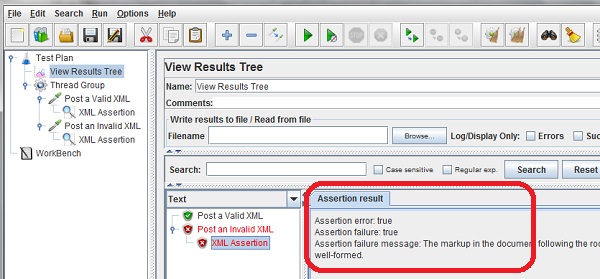
4. Run the test plan and open the "View Results Tree" listener. You see the "Post an Invalid XML" sampler failed, because the returned XML is invalid.
The picture below shows you how to use XML Assertion to identify invalid XML responses:
⇒ XPath Assertion - XPath Expression Matches
2018-10-08, ∼6107🔥, 0💬
Related Topics:
