Run JMeter Proxy Server
How to Run JMeter Proxy Server? I have the "HTTP(S) Test Script Recorder" component configured.
✍: FYIcenter.com
 If you have the "HTTP(S) Test Script Recorder" component configured,
you can follow this tutorial to
Run JMeter Proxy Server.
If you have the "HTTP(S) Test Script Recorder" component configured,
you can follow this tutorial to
Run JMeter Proxy Server.
1. Run JMeter and open "Recording-Controller-HTTP-Proxy.jmx".
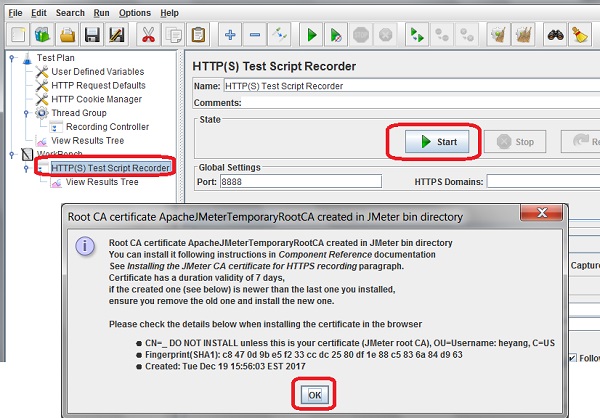
2. Open "HTTP(S) Test Script Recorder" under the "WorkBench". You see configuration settings for Click the "Start" button run the HTTP proxy. You see the warning message about the certificate
Root CA certificate ApachJMeterTemporaryRootCA created in JMeter bin directory

You can install it following instructions in Component Reference documentation
See Installing the JMeter CA certificate for HTTPS recording paragraph.
Certificate has a duration validity of 7 days,
if the created one (see below) is newer than the last one you installed,
ensure you remove the old one and install the new one.
...
3. Click "OK". JMeter is ready to record HTTP requests coming out of your browser with a proxy port of 8888.
There is no need to install the JMeter CA certificate, if you are not using HTTPS protocol.
The picture below shows you how to start JMeter HTTP proxy server:
⇒ Set Firefox for JMeter Proxy Server
⇐ Setup JMeter Proxy for Recording
2018-02-01, ∼5069🔥, 0💬
Related Topics:
