Record Test with Selenium IDE on Chrome
How to Record a new test with Selenium IDE on Chrome? I have Selenium IDE Chrome extension installed.
✍: FYIcenter.com
 If you want to create a new test by recording what your
activities in the Chrome browser with Selenium IDE,
you can follow this tutorial.
If you want to create a new test by recording what your
activities in the Chrome browser with Selenium IDE,
you can follow this tutorial.
1. Click the "Selenium IDE" icon in the Chrome Web address bar to start Selenium IDE.
2. Click "Create a new project" from the startup menu and enter "FYI Center" as the project name. You see Selenium IDE started.
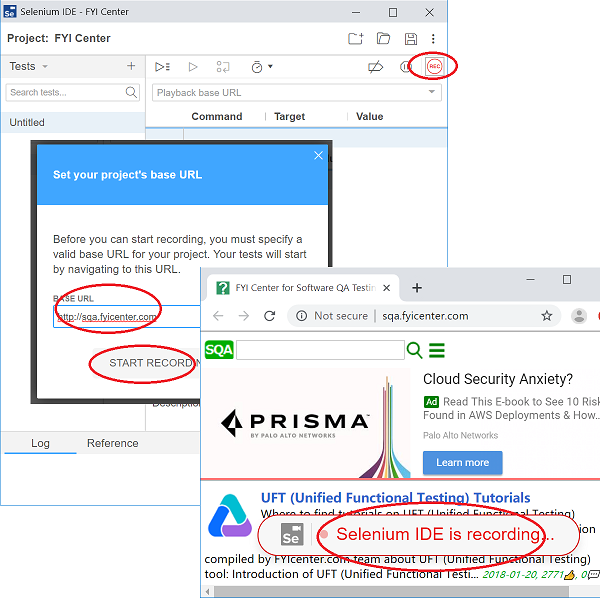
3. Click the "Recording" icon near the top right corner and enter "http://sqa.fyicenter.com" as the project base URL. You see a new Chrome browser window displayed with a recording warning banner displayed.
4. Continue to navigate on the Web site in the Chrome window. Your navigation steps will be recorded in the Selenium window.
See next tutorial on how to stop recording and review recorded steps.
⇒ Review Recorded Steps on Selenium IDE for Chrome
⇐ What Is Chrome IDE as Chrome Extension
2019-09-16, ∼3798🔥, 0💬
Related Topics:
