Installing UFT from DVD Package
How to install UFT (Unified Functional Testing) from the UFT DVD package? I just downloaded UFT_14_DVD_Electronic_Release.zip.
✍: Guest
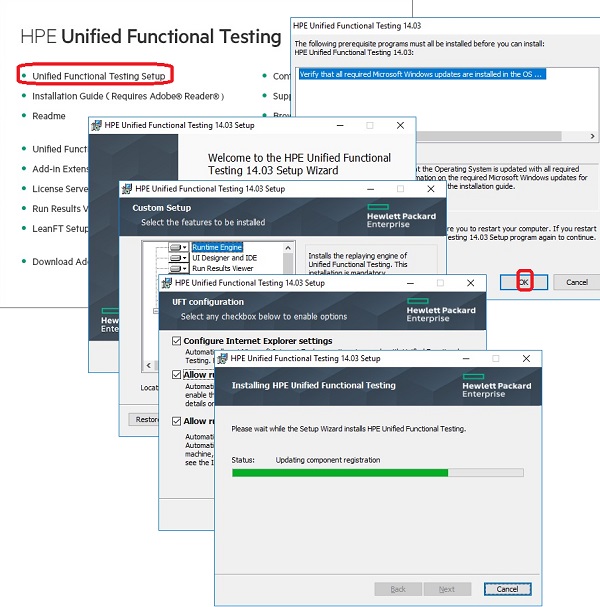
 You can follow these steps to install UFT from the DVD package:
0. Restart your computer to ensure all programs are closed.
1. Run setup.exe from the DVD, if you have the physical UFT 14 DVD.
2. Run setup.exe after you unzip the UFT_14_DVD_Electronic_Release.zip, if you donwloaded it electronically.
3. Click "Unified Functional Testing Setup" from the DVD menu. You see the prerequisite checking screen.
4. Select "OK" to continue. You see the installation wizard.
5. Click "Next" to continue. You see the installation feature selection list screen.
5. Click "Next" to continue. You see the configuration screen.
6. Click "Install" to continue. You see the installation progress screen.
7. Wait for a few minutes for the installation to finish.
⇒ Uninstalling UFT with Control Panel
2023-06-12, ∼1849🔥, 0💬
Related Topics:


