Uninstalling UFT with Control Panel
How to uninstall UFT (Unified Functional Testing) with Control Panel?
✍: Guest
 If you have an issue using UFT on your computer, you can consider uninstalling it.
But make sure you have the installation package ready on your computer to re-install it.
If you have an issue using UFT on your computer, you can consider uninstalling it.
But make sure you have the installation package ready on your computer to re-install it.
There are 2 ways to uninstall UFT on your computer:
- Using the "Uninstall a program" function in Control Panel. This is not a full uninstall. Some program files, data files or registry entries are still left on your computer. But this might be enough resolve your issue.
- Using the UFTUninstaller program. This is a full uninstall. It remove everything related to UFT from your computer. But you need download it from Micro Focus website first.
Here are the steps to uninstall UFT with Control Panel:
1. Close UFT, if it running.
2. Close all Web browser windows.
3. Go to "Control Panel\Programs\Programs and Features". You see HP Unified Functional Testing (UFT) listed as an installed program.
4. Select "HP Unified Functional Testing" and click "Uninstall". You see the uninstall confirmation message box.
5. Click "Yes" to finish the uninstallation.
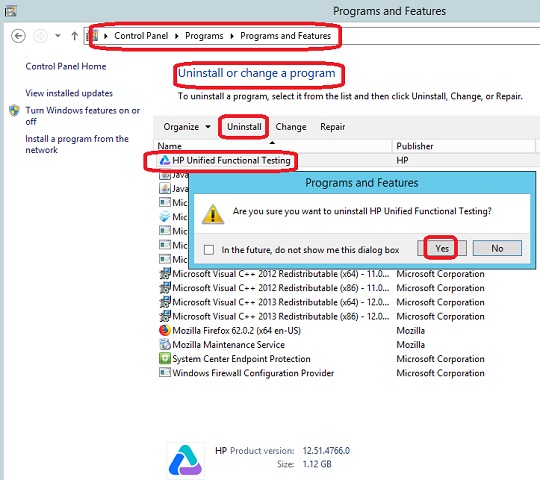
UFT is uninstalled from your computer now. Some program files, data files or registry entries are still left on your computer.
You can reinsatll UFT now. If the issue is still there, follow next tutorial to uninstall it with the UFTUninstaller program.
⇒ Uninstalling UFT with UFTUninstaller
⇐ Installing UFT from DVD Package
2023-06-12, ∼2393🔥, 0💬
Related Topics:


