Uninstalling UFT with UFTUninstaller
How to uninstall UFT (Unified Functional Testing) with the UFTUninstaller program?
✍: Guest
 If you want to do full uninsatll of UFT on your computer to resolve an installation issue,
you can follow these steps to uninstall UFT with the UFTUninstaller program:
If you want to do full uninsatll of UFT on your computer to resolve an installation issue,
you can follow these steps to uninstall UFT with the UFTUninstaller program:
0. Restart your computer to ensure all programs are closed.
1. Download UFTUninstaller.zip from Micro Focus. If you can not find it, ask their support to help.
2. Unzip UFTUninstaller.zip and run UFTUninstaller.exe.
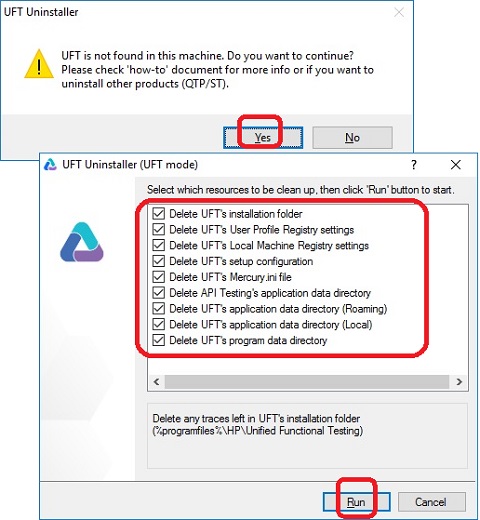
3. You may see "UFT not found" message box. Click "Yes" to continue. You see UFT uninstallation screen
4. Select "HP Unified Functional Testing" and click "Uninstall". You see the uninstall confirmation message box with a list of items to be removed from your computer.
5. Select all items and click "Run" to finish the full uninsatallation of UFT.
6. Click "Yes" to finish the uninstallation.
UFT is fully uninstalled from your computer now. You can re-install UFT from your UFT installation package.
⇒ Using UFT (Unified Functional Testing)
⇐ Uninstalling UFT with Control Panel
2023-06-12, ∼3885🔥, 0💬
Related Topics:


