Save Test Result to File
How to save test result to file? I want to keep them so that I can compare them with later runs.
✍: FYIcenter.com
 You can follow this tutorial
to save test result of your first JMeter load test.
You can follow this tutorial
to save test result of your first JMeter load test.
1. Start JMeter on your computer and open "\fyicenter\First-Load-Test-2.jmx".
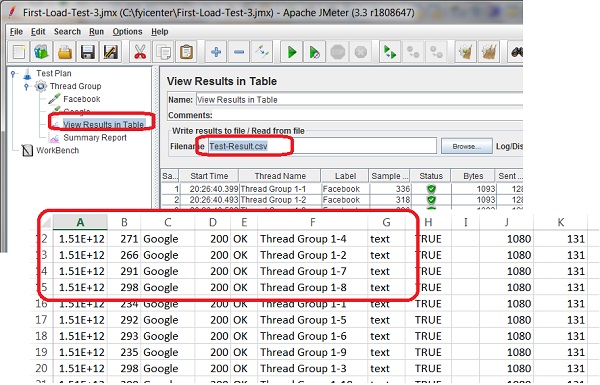
2. Click to open "View Results in Table" screen, and enter "Test-Result.csv" in the "Filename" field.
3. Save the test plan and run it again.
4. Open the "Test-Result.csv" in Excel. You see the test result is nicely saved in columns and headers.
5. You can also open "Test-Result.csv" in a text editor to view it.
The picture below shows you how to save JMeter load test result to a file:
⇒ Append Test Result to Old File
2017-11-18, ∼6480🔥, 0💬
Related Topics:
