Create MySQL Table for Test Result
How to Create Table to Store JMeter Test Result in MySQL database?
✍: FYIcenter.com
 You can follow this tutorial to create a table in MySQL database
to store JMeter test result.
You can follow this tutorial to create a table in MySQL database
to store JMeter test result.
1. Run MySQL command line client.
2. Connect to the MySQL server and database with the server information and your username/password.
\fyicenter\mysql\bin\mysql -h localhost -D fyicenter -u john -p NoOneKnows
3. Run the following MySQL command:
create table jmeter_test_result (
   timestamp bigint,
   elapsed int,
   label varchar(255),
   responsecode smallint,
   responsemessage varchar(40),
   threadname varchar(255),
   datatype varchar(255),
   success varchar(16),
   failuremessage varchar(255),
   bytes int,
   sentbytes int,
   grpthreads smallint,
   allthreads smallint,
   latency int,
   idletime int,
   connect int
);
4. Start JMeter on your computer and open "\fyicenter\First-Load-Test-3.jmx".
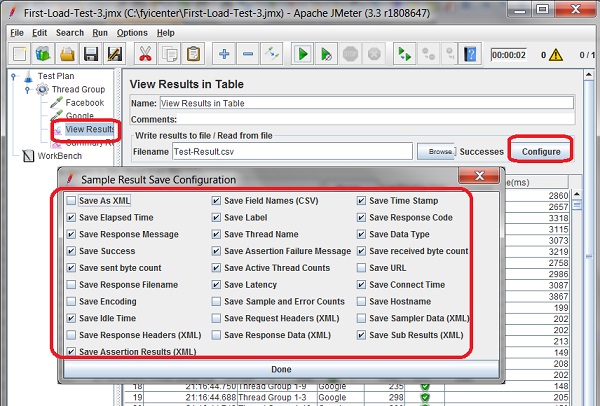
5. Click to open "View Results in Table" screen, and click the "Config" button. You see the "Sample Result Save Configuration" screen.
6. Review settings. It may impact the number of fields you are saving the test result file and the table columns.
The picture below shows you the Sample Result Save Configuration and list of fields saved in the test result table:
⇒ Load Test Result to MySQL Manually
⇐ JMeter MySQL Connection Requirement
2017-11-18, ∼3684🔥, 0💬
Related Topics:
