Add JDBC Connection Configuration
Q
How to add JDBC Connection Configuration to my JMeter Test Plan?
✍: FYIcenter.com
A
 You can follow this tutorial to
add JDBC Connection Configuration to my JMeter Test Plan.
You can follow this tutorial to
add JDBC Connection Configuration to my JMeter Test Plan.
1. Start JMeter on your computer and open "\fyicenter\First-Load-Test-3.jmx".
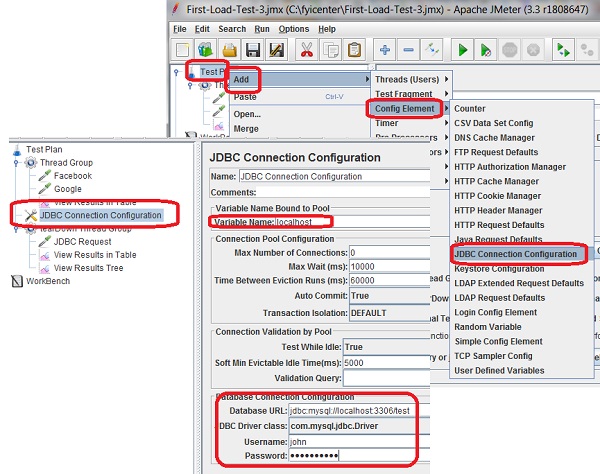
2. Right-click "Test Plan" and select "Add > Config Element > JDBC Connection Configuration" You see the "JDBC Connection Configuration" screen.
3. Enter the following settings:
Variable Name Bound to Pool: localhost
Database URL: jdbc:mysql://local:3306/fyicenter
JDBC Driver class: com.mysql.jdbc.Driver
Username: john
Password: NoOneKnows
4. Save the test plane to "\fyicenter\First-Load-Test-4.jmx".
The picture below shows you how to add JDBC Connection Configuration to JMeter test plan:
⇒ Test JDBC Connection Configuration
⇐ Load Test Result to MySQL Manually
2017-11-18, ∼3496🔥, 0💬
Related Topics:
