View Load Test Result Summary
How to view load test result summary? I want to know the average time of repeating sampler execution times.
✍: FYIcenter.com
 You can follow this tutorial to view result summary of your first JMeter load test.
1. Start JMeter on your computer and open "\fyicenter\First-Load-Test-2.jmx".
2. Right-click on the "Facebook Login Test Plan", and select "Add > Listener > Summary Report". You see the "Summary Report" settings screen.
3. Click "File > Save Test Plan As" menu and save it as "\fyicenter\First-Load-Test-3.jmx".
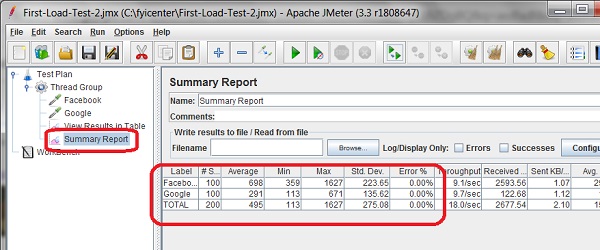
4. Click "Run > Start" menu to run the test. You see the summary report gets updated as more executions completed for each sampler.
When the test is done, you will see the final summary report over 100 executions on each sampler. As you can see, Facebook is about more than 2 times slower than Google.
The picture below shows you how to view summary report of a load test:
⇒ Saving Test Results to MySQL Database
2017-11-18, ∼3998🔥, 0💬
Related Topics:
