Append Test Result to Old File
How to append test result to an old existing file? I want test results to be saved in a single file.
✍: FYIcenter.com
 You can follow this tutorial
append JMeter test result to an old existing file.
You can follow this tutorial
append JMeter test result to an old existing file.
1. Start JMeter on your computer and open "\fyicenter\First-Load-Test-2.jmx".
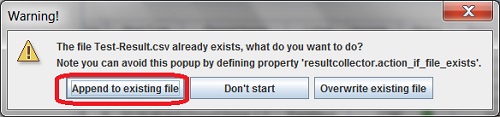
2. Run the test plan again. You will get a warning message:
The file Test-Result.csv already exist, what do you want to do?
Note you can avoid this popup by defining property
'resultcollector.action_if_file_exists'.

[Append to existing file] [Don't start] [Overwrite existing file]
3. Select "Append to existing file" to finish the run.
4. Open the "Test-Result.csv" in Excel. You see new test result is appended to the end.
5. Open \fyicenter\jmeter\bin\jmeter.properties in an editor. Then find and update the following line as shown below:
resultcollector.action_if_file_exists=APPEND
The picture below shows you how to append JMeter load test result to old files:
2017-11-18, ∼9927🔥, 0💬
Related Topics:
