Load Test Result to MySQL Automatically
How to load JMeter test result MySQL database automatically? I have JDBC connection configured correctly for MySQL server.
✍: FYIcenter.com
 You can follow this tutorial to
load JMeter test result to MySQL database automatically.
You can follow this tutorial to
load JMeter test result to MySQL database automatically.
1. Start JMeter on your computer and open "\fyicenter\First-Load-Test-5.jmx".
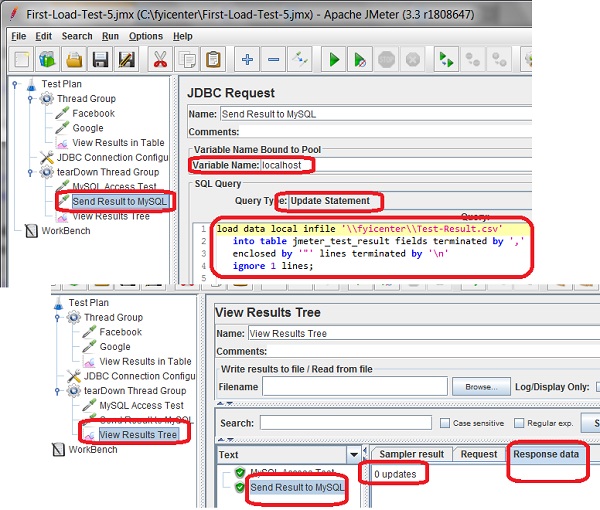
2. Add another JDBC Request sampler in "tearDown Thread Group" with the following settings:
Name: Send Result to MySQL
Variable Name Bound to Pool: localhost
Query Type: Update Statement
Query: load data local infile '\\fyicenter\\Test-Result.csv'
   into table jmeter_test_result fields terminated by ','
   enclosed by '"' lines terminated by '\n'
   ignore 1 lines;
3. Save the test plan as "\fyicenter\First-Load-Test-5.jmx" and run it.
4. Click "Send Result to MySQL" in the "View Result Tree" screen. Then open the "Response Data" tab. You see the query result:
0 updates
So something wrong in the execution process. The design is perfect:
- The "View Results in Table" listener saves result of each sampler execution in the load test thread group to the file: Test-Result.csv.
- The "Send Result to MySQL" JDBC request in the tear down thread group loads it the MySQL database.
The root cause is that JMeter caches test results in memory and flush them to the file periodically. In the above example, when the "Send Result to MySQL" JDBC request reads the "Test-Result.csv", it is still empty.
See the next tutorial on how to force JMeter to flush out results to file immediately.
The picture below shows you how to send test result to MySQL database with JDBC request sampler:
⇒ Auto Flush JMeter Test Result to File
⇐ View Result of JDBC Request Sampler
2017-09-20, ∼5815🔥, 0💬
Related Topics:
